
Description
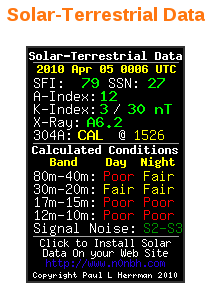
This WordPress widget plugin makes it easy to add a banner from N0NBH’s site showing solar & terrestrial data to a WordPress site. The widget is configurable, allowing the site administer to select which banner to display.
Compatibility
This widget plugin has been tested on WordPress 6.1.1 and should work on previous 6.x versions as well. PHP 5.x is required.
Installation Instructions
Manual installation:
- Add a directory called ’hf-solar’ (without the quotes) to your ‘/wp-content/plugins/’ directory.
- Upload hfsolar.php to ‘/wp-content/plugins/hf-solar/’ directory.
- Activate the plugin through the ‘Plugins’ page in WordPress.
- Place the widget in the sidebar using the editor for your theme.
- Choose the particular type of banner you would like to display.
Automatic installation:
- Download the hfsolar.zip file.
- Go to the Manage Plugins page.
- Click the Add New button.
- Upload the hfsolar.zip file.
- Active the plugin through the ‘Manage Plugins’ page.
- Place the widget in the sidebar using the editor for your theme.
- Choose the particular type of banner you would like to display.
Options
The HF solar widget allows you to choose which type of banner you would like to have displayed.
Works great on the latest version of WP, installed right from the plugin gallery in the admin panel.
great! that’s the best way to see what’s going on beyond the limits of our solar system
Now March 2013 with WordPress 3.5.1 -> works perfect , thanks.
update:
WordPress 3.5.2 July 2013 > Perfect
WordPress 4.1.1 4-16-2015 works great. Thank You.
Working on WordPress 4.2.2 so far! Thanks!
Plugin installed 100%, but does not seem to update at all. Keeps on showing an old date?
I have the same problem of plugin not updating in WordPress.
Also having an issue on my WordPress site that the widget does not update, instead showing out of date data. This appears to be somehow tied to the cache. Something is preventing it from reloading an updated image.
It works for me.
I run wordpress and it will not update. Please advise fix.
The latest wordpress, HF Solar Plugin stop update. Any hint?
Thank you!
No longer works with WordPress
If you have banner on https site it will not update, whereas on non https site, the banner will update.